Home-CMM probes, software and retrofits-CMM support-CMM knowledgebase-3-axis systems-Scanning probe systems-SP600 range-SP600 installation and user's guide

Navigation

CMM support

  • CMM knowledgebase
  • 3-axis systems
  • Scanning probe systems
  • SP600 range
  • SP600 installation and user's guide
  • General information
  • Product compliance
  • Safety
  • Introduction
  • Product range
  • Probe dimensions
  • Technical specification
  • Application - scanning
  • Probe installation
  • SCR600 mounting plate insert
  • SCR600 installation
  • Datuming SCR600
  • SCR600 pick up / put down routine
  • Datuming SCP600
  • SCP600 pick up / put down routines
  • Styli
  • Probe measurement range
  • AC2 interface card
  • AC2 screening
  • System connection
  • Using the AC2 card
  • AC2 software interface
  • SP600 probe connector
  • SP600 overtravel / PICS connector
  • Using the SP600, SP600M and SP600Q
  • SP600 fault diagnosis
  • Appendix 1 - Probe signals
  • Appendix 2 - Cables
  • Appendix 3 - Multiple Renishaw probe type installations

Navigation

CMM support

  • CMM knowledgebase
  • 3-axis systems
  • Scanning probe systems
  • SP600 range
  • SP600 installation and user's guide
  • General information
  • Product compliance
  • Safety
  • Introduction
  • Product range
  • Probe dimensions
  • Technical specification
  • Application - scanning
  • Probe installation
  • SCR600 mounting plate insert
  • SCR600 installation
  • Datuming SCR600
  • SCR600 pick up / put down routine
  • Datuming SCP600
  • SCP600 pick up / put down routines
  • Styli
  • Probe measurement range
  • AC2 interface card
  • AC2 screening
  • System connection
  • Using the AC2 card
  • AC2 software interface
  • SP600 probe connector
  • SP600 overtravel / PICS connector
  • Using the SP600, SP600M and SP600Q
  • SP600 fault diagnosis
  • Appendix 1 - Probe signals
  • Appendix 2 - Cables
  • Appendix 3 - Multiple Renishaw probe type installations

SP600 installation and user's guide

Document part number H-1000-5175-08-A
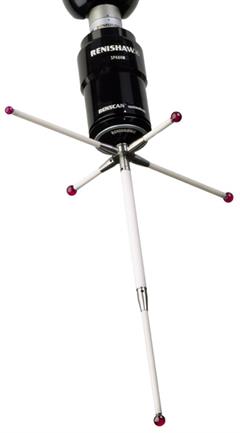
SP600 with star stylus (cutout)

NOTE: Please use the left-hand navigation to view this complete document. The headings under the main title are links to each section of the guide.

Click here if you prefer to download a PDF version of this guide.

For other manuals and product documentation visit www.renishaw.com/CMMmanuals.

CMM support

  • Knowledgebase
  • Manuals and installation guide downloads
  • Software downloads

CMM probes, software and retrofits

  • Hardware
  • Software
  • Retrofit
  • Support and downloads
  • 5-axis technology